Scope queries to a tenant
Tenant-scoped generation
In a multi-tenant schema, each user should see only their own tenants’ rows. Declare how your schema represents tenancy in a tenant policy, and pass the caller’s tenant scope on each call. AskDB then has the model filter every scoped table by tenant, checks that the filter is there, and binds your tenant IDs. Keep the database as the tenant boundary: see Tenant isolation.
Before you start
Section titled “Before you start”- A schema artifact and a service that calls
ask(). Embed in a Node app sets one up. - Your application knows which tenants each user may see. AskDB binds the scope you pass, but never decides it, so authorizing it stays your job.
1. Write the tenant policy
Section titled “1. Write the tenant policy”The recommended path is Studio’s Tenancy view, which guides you through declaring tenant roots, scoped tables, and global tables in a form. Studio can also draft a policy with AI from your schema’s tables, keys and foreign keys, for your review.
You can also write tenant-policy.md in the schema artifact by hand. Every table or column reference uses the stable IDs from schema.json. Example for a simple SaaS schema:
---schemaId: my-appenforcement: strict
roots:  - id: table:public.organizations    tenantIdColumn: table:public.organizations#id    label: Organization
scopedTables:  - id: table:public.projects    scopeThrough:      - root: table:public.organizations        column: table:public.projects#organization_id  - id: table:public.documents    scopeThrough:      - root: table:public.organizations        column: table:public.documents#organization_id
globalTables:  - table:public.plan_tiers  - table:public.countries---
# Tenant Policy
Organizations are the only tenant level. Projects and documents carry adirect `organization_id`; plan tiers and countries are shared lookups.
Classify every table: a table in none of scopedTables, polymorphicTables or globalTables is unknown, and a query that names it triggers a warning, and in strict mode an error. Start with enforcement: strict. Field reference lists every field.
loadSchema() checks the policy against schema.json when it loads the artifact. Under strict, a policy that names IDs schema.json doesn’t have, or a column on another table than its entry’s, doesn’t load: see When the policy and the schema disagree.
2. Pass the caller’s tenant scope
Section titled “2. Pass the caller’s tenant scope”With a policy in place, every ask() call needs a tenantScope. Build it from the IDs your application authorized for this user:
// askdb initialized at startup with createAskDb() — see Embed in a Node app.const tenantScope = {  access: {    kind: "ids",    tenantRoot: "table:public.organizations",    ids: ["org_abc123"],  },} as const;
// tenantSqlMode defaults to "sql-params": the tenant IDs come back as driver parameters.const result = await askdb.ask("How many documents did we create this month?", {  tenantScope,});
access.kind picks the scope’s shape:
ids: exact tenant IDs on one root, the common case.multi_root: IDs across several roots, each with its own list.subtree: a root’s IDs and everything beneath them. See Scope to a tenant hierarchy.global: deliberately unscoped, with areasonfor the audit trail. The tenant check is skipped, and SQL that still uses a tenant placeholder throwsTenantScopeError.
The optional context, such as a role or a department, goes into the prompt as advisory text, and nothing enforces it. Polymorphic tables are declared in the policy and surfaced to the model through the prompt; there’s no scope field for pre-resolving them at runtime. TenantScope lists every field.
3. Run the SQL
Section titled “3. Run the SQL”In the default tenantSqlMode, "sql-params", the tenant IDs come back as driver parameters. Run one of the two pairs:
// Two executable pairs — pick one, never concatenate the arrays.if (result.unboundSql && result.params) { // Every value bound; params already includes the tenant IDs. await pool.query(result.unboundSql, result.params);} else { // Business values inlined; tenant markers start at $1. await pool.query(result.sql, result.tenantParams);}For a question like “how many documents this month?”, the model writes the tenant predicate with a placeholder, and AskDB binds your IDs into it. Without the policy, the SQL might be:
SELECT COUNT(*) FROM documents WHERE created_at >= NOW() - INTERVAL '1 month';With the policy and an ids scope for org_abc123, in the default mode:
SELECT COUNT(*) FROM documentsWHERE organization_id = $1 AND created_at >= NOW() - INTERVAL '1 month';To get one SQL string with the IDs inlined instead, set tenantSqlMode: "sql-only": see SQL output modes. To rerun a query for the same caller with a new value, see Rerun a query with new values.
4. Try it in Studio’s Playground
Section titled “4. Try it in Studio’s Playground”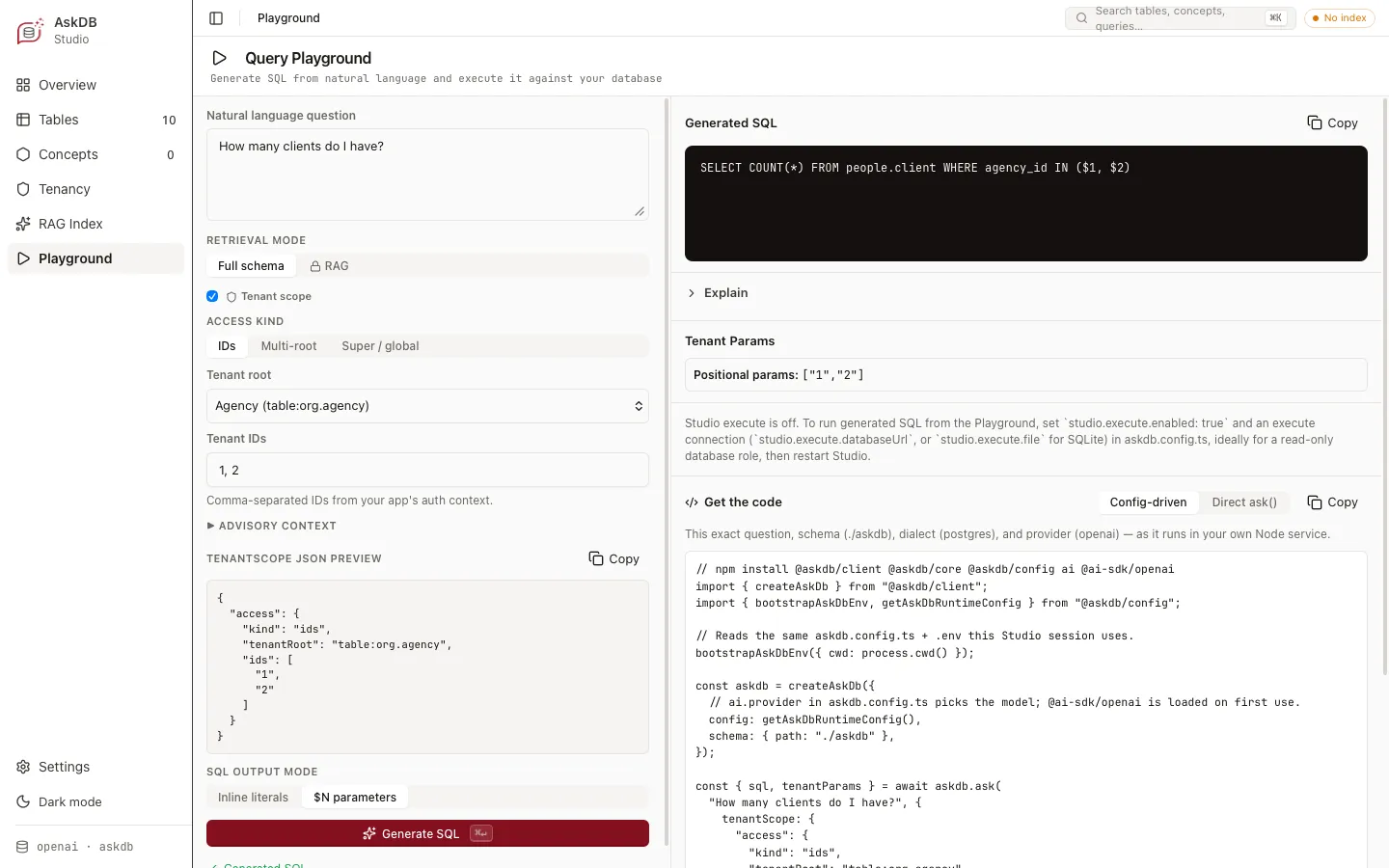
With a tenant policy, the Playground’s Tenant scope box is ticked. Choose the access kind (IDs, Multi-root or Super / global), then the tenant root and its IDs, or the reason for a global scope. Advisory context adds the scope’s context, and the tenantScope JSON preview shows the scope Studio passes. SQL output mode switches between $N parameters, the default, and Inline literals. Generate SQL shows the SQL with its tenant parameters.
5. Enforce it in the database
Section titled “5. Enforce it in the database”AskDB’s tenant check is a heuristic over the SQL’s tokens, so a query can get past it. Make the database the tenant boundary: Enforce tenancy in the database sets up Postgres row-level security, and Tenant isolation explains why.
If it fails
Section titled “If it fails”| Error | Fix |
|---|---|
TenantScopeError MISSING_SCOPE | Pass a tenantScope on every call. A schema with a policy needs one. |
TenantScopeError GLOBAL_WITHOUT_REASON | Give the global scope a non-blank reason. |
TenantScopeError UNRESOLVED_TENANT_PLACEHOLDER | The SQL uses a tenant placeholder the scope has no IDs for, such as any placeholder under a global scope. Pass a scope that covers that root. |
TenantGuardrailError | The SQL fails the tenant check. What the tenant check requires lists each rule. |
SchemaParseError naming tenant-policy.md | The policy has a key AskDB doesn’t know, or, under strict, names IDs schema.json doesn’t have or a column on another table than its entry’s. See When the policy and the schema disagree. |
TenantScopeError reasons lists the rest.
Read next
Section titled “Read next”© 2026 Yahya Gilany